# Contribution guidelines
## Welcome
Welcome to mlr-gd! First off, thank you for taking the time to contribute.
We appreciate all types of contributions be it small or large and are
happy for your interest in the project.
## Overview
mlr-gd is a Python package that provides tools and resources for
multiple linear regression using gradient descent. This package is
made for cases where a linear regression model needs to be implemented
with a large or complex dataset easily and efficiently. mlr-gd uses
NumPy for efficient numerical operations, data handling, and
mathematical computations.
## Table of contents
1. [Welcome](#welcome)
2. [Overview](#overview)
3. [Resources](#resources)
4. [Before you start](#before-you-start)\
4.1. [Your Ideas & Contributions](#your-ideas--contributions)
5. [How we work](#how-we-work)\
5.1. [We use GitHub](#we-use-github)\
5.2. [Report bugs using Github issues](#report-bugs-using-github-issues)\
5.3. [Roadmap](#roadmap)\
5.4. [Changelog](#changelog)
6. [How we release](#how-we-release)\
6.1. [Versioning](#versioning)\
6.2. [Code names](#code-names)
7. [Style guide](#style-guide)\
7.1. [Docstrings](#docstrings)\
7.2. [Type hints](#type-hints)\
7.3. [Comments](#comments)\
7.4. [Module-level dunders](#module-level-dunders)
8. [How you can help](#how-you-can-help)\
8.1. [Bug reporting](#bug-reporting)\
8.2. [Suggesting enhancements](#suggesting-enhancements)\
8.3. [Review pull requests](#review-pull-requests)\
8.4. [Spread the word](#spread-the-word)\
8.5. [Improve documentation](#improve-documentation)
9. [Pull requests](#pull-requests)\
9.1. [Smaller is better](#smaller-is-better)\
9.2. [Coordinate bigger changes](#coordinate-bigger-changes)\
9.3. [Prioritize understanding over cleverness](#prioritize-understanding-over-cleverness)\
9.4. [Include test coverage](#include-test-coverage)\
9.5. [Add documentation](#add-documentation)
10. [Contribution notice](#contribution-notice)
11. [Contribution credits](#contribution-credits)\
11.1. [Attribution for contributions](#attribution-for-contributions)\
11.2. [Recognizing external contributions](#recognizing-external-contributions)
12. [Attribution](#attribution)
## Resources
* [Roadmap](https://github.com/users/DrSolidDevil/projects/5)
## Before you start
Before contributing, please take a moment to review our guidelines and
[code of conduct](https://github.com/DrSolidDevil/mlr-gd/blob/main/CODE_OF_CONDUCT.md).
This helps ensure a smooth collaboration for everyone.
To contribute, you'll need a GitHub account. If you don’t have one
yet, follow these
[instructions](https://docs.github.com/en/get-started/start-your-journey/creating-an-account-on-github).
### Your Ideas & Contributions
We always appreciate new ideas! However, before working on a
non-trivial feature, please start a discussion to ensure alignment
with the project's goals. We prioritize contributions that address
known issues and planned features, as they tend to have the greatest
impact—but don’t let that discourage you! Your input is always
valuable.
We look forward to collaborating with you!
## How we work
### We use GitHub
We use GitHub to host code, for discussions, to track issues and
feature requests, as well as accept pull requests.
### Report bugs using Github issues
We use GitHub issues to track public bugs. Report a bug by opening a
new issue. For bugs that constitute a security vulnerability, please
report it by following the steps described in the [security
policy](https://github.com/DrSolidDevil/mlr-gd/blob/main/SECURITY.md).
### Roadmap
We plan features and releases ahead of time using a
[roadmap](https://github.com/users/DrSolidDevil/projects/5).
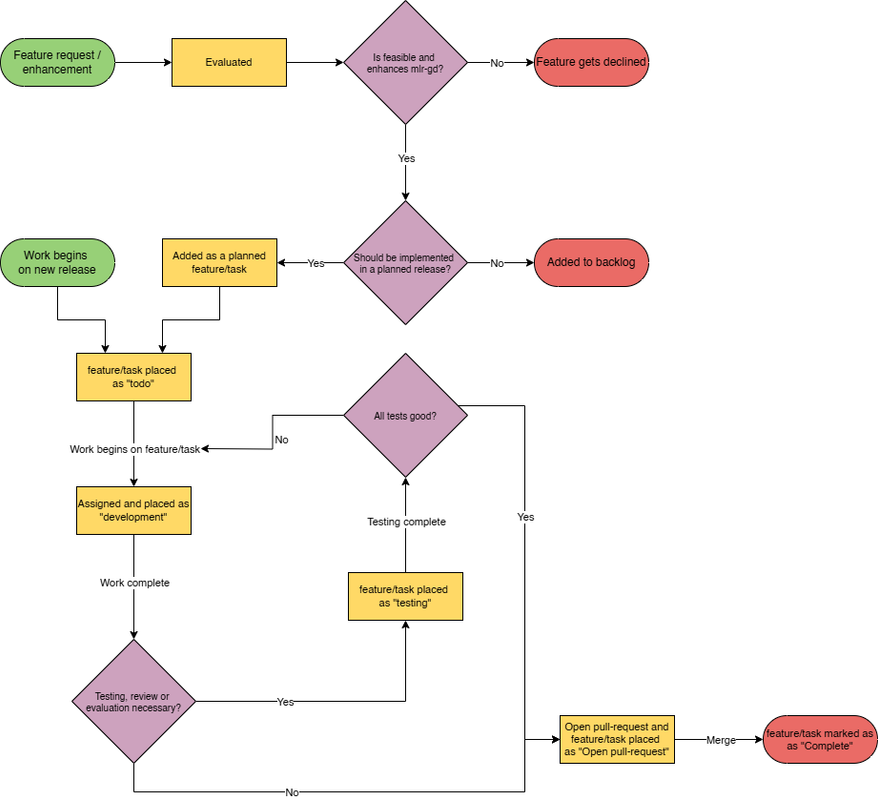
Initially suggested features are evaluated for feasibility and
usefulness, if determined to be useful it is either placed in the
backlog or added to a version as a planned task.
Each task has an assigned complexity based on difficulty and time
ranging from very easy to extremely difficult.
When work on a release begins, the features and tasks planned for it
get set to “todo”.
When someone begins work on a task they assign themselves to it and
the status is set to “development”.
Upon completing development of a feature it is tested/evaluated if
deemed appropriate.
When testing/evaluation is complete or it was determined unnecessary;
it gets opened as a pull-request to merge with the development branch
and the task gets the status “Open pull-request”.
When a pull-request gets merged it is marked as “Complete”.
### Changelog
To help users and contributors understand what substantial changes have
taken place between each version of mlr-gd, we keep a changelog.
* The changelog is ordered in recency, with the latest changes at the top.
* Headers should be linked to the release.
* Similar changes should be grouped when possible.
* If appropriate, add a short summary of the version changes, no longer than two to three lines.
* Strive for conciseness.
Our changelog is quite simple and follows this template:
```markdown
## VERSION (DATE)
### Added
* LIST OF ADDED FEATURES
### Changed
* LIST OF CHANGES TO EXISTING FUNCTIONALITY
### Deprecated
* LIST OF SOON-TO-BE DEPRECATIONS
### Removed
* LIST OF REMOVED FEATURES
### Fixed
* LIST OF BUG FIXES
### Security
* LIST OF FIXED VULNERABILITIES]
### Documentation
* LIST OF DOCUMENTATION CHANGES
```
Sections that are not relevant to the release are no to be included.
## How we release
Releases are expected to have been tested and reviewed.
All major releases should be preluded by a pre-release, alpha, beta or
equivalent where users can test the new release and give feedback and
opinions.
### Versioning
mlr-gd follows the [semantic versioning](https://semver.org/) scheme
(Major.Minor.Patch).
### Code names
All major versions have a code name, these code names are the names of
mathematicians; from A to Z with the first letters place in the
alphabet being the same as the version.
The code names should only be used for the release major versions
(x.0.0) with all other releases exclusively being the version.
While you can refer to all versions by their code name followed by
the minor and patch (i.e., Name Minor.Patch), official documentation
should use semantic versioning (i.e., Major.Minor.Patch).
## Style Guide
### Docstrings
We use [google-style](https://google.github.io/styleguide/pyguide.html#381-docstrings)
docstrings for functions, classes, and modules.
All functions, classes, and modules should strive to have a
comprehensive docstring explaining its purpose and usage.
Variables and attributes should also strive to have a docstring since
sphinx and some IDEs can read these. This creates a more comprehensive
documentation and a better user experience.
### Type hints
Always use type hints to improve code readability and maintainability.
This helps with static analysis and improves auto-completion in IDEs.
### Comments
* Use inline comments sparingly and only when the logic is not
immediately obvious.
* Prefer explanatory variable names over excessive comments.
* Place inline comments above complex code blocks, not beside them.
### Module-level dunders
Module-level dunders such as \_\_author\_\_ and \_\_status\_\_ exist
to maintain clarity and consistency across modules.
All except \_\_status\_\_ should only be used at the module level.
\_\_status\_\_ has the purpose of ensuring that code in development
does not get accidentally released before completion. Before a release
can be made, all files with \_\_status\_\_ have to have it set to
“Production”.
To maintain clarity and consistency across modules, include the
following module-level dunder
\_\_status\_\_ can either be “Prototype” for code in the experimental
phase, “Development” for code that is being worked on or undergoing
testing, “Production” is for code that is released or release ready.
## How you can help
You can help in many ways and we appreciate all of them. This includes
bug reporting, feature suggestions, code contributions and even just
starring the project on GitHub or sharing it on social media.
### Bug reporting
A good bug report shouldn’t leave others needing to chase you up for
more information. Therefore, we ask you to investigate carefully,
collect information and describe the issue in detail in your report.
Please complete the following steps in advance to help us fix any
potential bug as fast as possible.
- Make sure that you are using the latest version.
- Determine if your bug is really a bug and not an error on your
side e.g. using incompatible environment components/versions (Make
sure that you have read the documentation. If you are looking for
support, you might want to check this section).
- To see if other users have experienced (and potentially already
solved) the same issue you are having, check if there is not already a
bug report existing for your bug or error in the bug tracker.
- Also make sure to search the internet (including Stack Overflow)
to see if users outside of the GitHub community have discussed the
issue.
- Collect information about the bug:
- Stack trace (Traceback)
- OS, Platform and Version (Windows, Linux, macOS, x86, ARM)
- Version of the interpreter, compiler, SDK, runtime environment,
package manager, depending on what seems relevant.
- Possibly your input and the output
Can you reliably reproduce the issue? And can you also reproduce it
with older versions?
#### How do I submit a good bug report?
You must never report security related issues, vulnerabilities or bugs
including sensitive information to the issue tracker, or elsewhere in
public. Instead sensitive bugs are to be reported as described in the
[security policy](https://github.com/DrSolidDevil/mlr-gd/blob/main/SECURITY.md).
We use GitHub issues to track bugs and errors. If you run into an
issue with the project:
- Open an Issue. (Since we can’t be sure at this point whether it is
a bug or not, we ask you not to talk about a bug yet and not to label
the issue.)
- Explain the behavior you would expect and the actual behavior.
- Please provide as much context as possible and describe the
reproduction steps that someone else can follow to recreate the issue
on their own. This usually includes your code. For good bug reports
you should isolate the problem and create a reduced test case.
- Provide the information you collected in the previous section.
#### Once it’s filed:
- The project team will label the issue accordingly.
- A team member will try to reproduce the issue with your provided steps.
- If the team is able to reproduce the issue, it will be left to be
implemented by someone.
### Suggesting enhancements
This section guides you through submitting an enhancement suggestion
for mlr-gd, including completely new features and minor improvements
to existing functionality. Following these guidelines will help
maintainers and the community to understand your suggestion and find
related suggestions.
#### Before submitting an enhancement
- Make sure that you are using the latest version.
- Read the documentation carefully and find out if the functionality
is already covered, maybe by an individual configuration.
- Perform a search to see if the enhancement has already been
suggested. If it has, add a comment to the existing issue instead of
opening a new one.
- Find out whether your idea fits with the scope and aims of the
project. It’s up to you to make a strong case to convince the
project’s developers of the merits of this feature. Keep in mind that
we want features that will be useful to the majority of our users and
not just a small subset. If you’re just targeting a small minority of
users, consider writing an add-on/plugin library.
#### How Do I Submit a Good Enhancement Suggestion?
Enhancement suggestions are tracked as GitHub issues.
- Use a clear and descriptive title for the issue to identify the suggestion.
- Provide a step-by-step description of the suggested enhancement in
as many details as possible.
- Describe the current behavior and explain which behavior you
expected to see instead and why. At this point you can also tell which
alternatives do not work for you.
- Explain why this enhancement would be useful to most mlr-gd users.
You may also want to point out the other projects that solved it
better and which could serve as inspiration.
### Review pull requests
Reviewing pull requests is a great way to contribute without writing
new code. It helps maintainers by ensuring code quality and
consistency while also helping contributors improve their work.
How to Review a PR
- Check the Code Quality
1. Is the code readable and maintainable?
2. Does it follow the project’s coding style and naming conventions?
3. Are functions and classes properly documented with docstrings?
- Verify the Functionality
1. Does the feature or fix work as described?
2. Are edge cases and potential issues handled?
3. If applicable, does it include unit tests?
- Run the Code Locally (if needed)
1. Pull the contributor’s branch and test the changes in your local
environment.
2. Check if the changes introduce any unexpected errors or conflicts.
- Provide Constructive Feedback
1. Be polite and encouraging—contributors are helping the project!
2. Point out specific areas for improvement and suggest fixes.
3. If the PR is great, approve it with a 👍 or a comment.
### Spread the word
If you love this project, let others know about it! The more people
using and contributing, the stronger and better the project becomes.
Here’s how you can help spread the word:
#### Star & Share the Repository
- Star this project on GitHub to show your support.
- Share the repository link on social media, developer forums, and
Discord communities.
#### Write a Blog Post or Tutorial
If you’ve used this project in an interesting way, consider writing
about it! You could:
- Publish a tutorial on Medium, Dev.to, or your personal blog.
- Share a case study explaining how this project helped solve a problem.
- Create a YouTube video demonstrating how to use the package.
#### Recommend it in Developer Communities
- Mention it in Stack Overflow answers where relevant.
- Discuss it in Reddit’s r/python, Hacker News, or Discord servers.
- If you attend meetups or conferences, introduce this project to
fellow developers.
#### Help Find New Contributors
More contributors mean faster development and better support. You can:
- Encourage friends and colleagues to contribute.
- Share "Good First Issues" from the GitHub repo for beginners to work on.
- Mentor newcomers who want to get started with open source.
### Improve documentation
Good documentation is just as crucial as good code! Clear and
well-structured documentation helps users understand and use the
project effectively. You can contribute to the documentation in
several ways:
#### Fix Typos & Improve Clarity
Even small changes, such as fixing typos, improving grammar, or
rewording confusing sentences, make a big difference. If you notice
anything unclear, feel free to submit a pull request with an improved
version.
#### Expand Existing Documentation
Some areas may lack detailed explanations, examples, or step-by-step
guides. Consider improving sections such as:
- Installation Guides – Ensure they are up to date and work on
different platforms.
- Usage Instructions – Provide examples of how to use the library effectively.
- API Documentation – Add missing docstrings or improve existing
ones for better clarity.
- Troubleshooting & FAQs – Document common issues and how to resolve them.
#### Add Code Examples
Code snippets make it easier for users to understand how to implement
and use different features. If you find documentation without
examples, consider adding:
- Simple, self-contained examples for quick reference.
- More advanced use cases demonstrating best practices.
#### Contribute to the README
The README is the first thing users see, so it should be concise,
clear, and helpful. If you think it can be improved, suggest changes
or contribute.
To contribute to the documentation, follow the same process as
contributing code: fork, edit, commit, and submit a pull request!
## Pull requests
We love pull requests! Before forking the repo and creating a pull
request for non-trivial changes, it is usually best to first open an
issue to discuss the changes, or discuss your intended approach for
solving the problem in the comments for an existing issue.
### Smaller is better
Submit one pull request per bug fix or feature. A pull request should
contain isolated changes pertaining to a single bug fix or feature
implementation. Do not refactor or reformat code that is unrelated to
your change. It is better to submit many small pull requests rather
than a single large one. Enormous pull requests will take enormous
amounts of time to review, or may be rejected altogether.
### Coordinate bigger changes
For large and non-trivial changes, open an issue to discuss a strategy
with the maintainers. Otherwise, you risk doing a lot of work for
nothing!
### Prioritize understanding over cleverness
Write code clearly and concisely. Remember that source code usually
gets written once and read often. Ensure the code is clear to the
reader. The purpose and logic should be obvious to a reasonably
skilled developer, otherwise you should add a comment that explains
it.
### Include test coverage
Add unit tests or UI tests when possible. Follow existing patterns for
implementing tests.
### Add documentation
Document your changes and update the documentation if necessary to
reflect the changes made
This includes the example projects if necessary, to exercise any new
functionality you have added.
## Contribution notice
By contributing to this project, you agree that any code,
documentation, or other materials you submit will be licensed under
the project’s existing open-source license. This ensures that all
contributions remain consistent with the project's legal framework and
can be freely used, modified, and distributed by others.
Key Points:
- Your contributions will be covered under the BSD 3-Clause License.
- You must have the right to contribute the code (i.e., no
proprietary or third-party code without permission).
- Contributions are made on a voluntary basis, with no expectation
of compensation or attribution beyond the project's standard
acknowledgment practices.
## Contribution credits
We believe in giving credit where it’s due. Here’s how authorship and
contributions are recognized in this project:
### Attribution for contributions
- All contributors are listed in the Git history of the repository.
Your commits and pull requests will reflect your contributions.
- Pivotal contributors may be added as an author of a file, either
via file comments or in dunders.
- Contributions beyond minor changes may be added into a credits
dunder or in certain cases attributed in a file with comments.
- If you make a notable impact (e.g., adding a major feature, fixing
critical bugs, or improving documentation substantially), we may
acknowledge you in the release notes.
### Recognizing external contributions
- If you contribute based on someone else’s idea or external
research, please credit the original source in comments, commits or
documentation.
- Contributions inspired by blog posts, academic papers, or other
open-source projects should include proper attribution when
appropriate.
## Attribution
We appreciate the teams responsible for the following documents, which
provided us with valuable content and inspiration.
* [https://gist.github.com/briandk/3d2e8b3ec8daf5a27a62](https://gist.github.com/briandk/3d2e8b3ec8daf5a27a62)
* [https://contributing.md/](https://contributing.md/)
* [https://www.tensorflow.org/community/contribute/code](https://www.tensorflow.org/community/contribute/code)
`Thank you for reading and happy coding!`